
Fees & tools
Koinly duplicate transactions after API and CSV imports: how to check the overlap
Seeing duplicate transactions after combining Koinly API and CSV imports? Compare the source records, preserve valid transfers, and check a recoverable correction before importing again.
Koinly duplicate transactions after API and CSV imports need a source check before you remove anything. Start with one suspicious pair: establish where each entry came from, whether both represent the same event, and which record preserves the complete transaction. A balance that suddenly looks too high is a reason to investigate, not proof that every recent entry is duplicated.
This guide is for readers whose transaction history changed after combining an exchange connection with a file upload. It covers record accuracy, not tax classification or the correctness of a tax return.
Why the duplicate check may let both records through
Koinly says its duplicate detection requires an exact match, including details such as time, currency, amount and transaction hash. API data and CSV exports can describe the same activity differently. Rounding, timestamp differences, or an order summary versus individual fills can prevent a match. Re-uploading an unchanged file is therefore different from importing a second representation of the same history. Source: Koinly's duplicate-detection rules.
Before another upload, record the wallet involved, the files already imported and the periods they cover. Keep original exports unchanged; put your comparison notes in a separate document. Our guide to preserving transaction records for reconciliation explains what to retain with those files.
Build a comparison for one suspected duplicate
Choose one pair you can trace back to the exchange. Do not start by selecting every transaction on the same date. Compare the following evidence side by side:
| Check | Question to resolve |
|---|---|
| Origin | Did one entry arrive through API and the other through a file? Were they imported into the correct wallet? |
| Event reference | Do the exchange references identify the same event, or are you comparing an order with one of its executions? |
| Time | Do the full timestamps refer to the same instant after accounting for their documented timezones? |
| Asset and direction | Is each entry the same asset moving in the same direction, rather than the asset spent and the asset received? |
| Quantity and fee | Can you explain the quantities, precision and fee currency from the original records? |
| Connected entries | Does either record already belong to a transfer linked with another wallet? |
If the time comparison is unclear, align UTC timestamps before reconciling records. Preserve both original values alongside your normalized comparison. Do not change an unexplained timestamp just to make a pair match.
Two similar amounts are insufficient evidence. Your conclusion should identify the original event and explain why the second imported representation adds no separate activity. If you cannot do that, leave the pair unresolved and ask support to inspect it.
Keep legitimate multi-row activity intact
Some exports deliberately represent one transaction across multiple rows. Kraken's documentation, for example, shows a trade as separate currency debits and credits in Ledger history, linked by a shared reference. Trades history instead describes the execution. A repeated reference across different assets does not by itself identify a duplicate row. Source: Kraken's comparison of Ledger and Trades history.
For Kraken purchases that seem absent from one report, first check the ledger export for instant buys. Resolve report coverage before deciding which records are redundant.
Also inspect transfer relationships. Koinly advises keeping an already matched transfer and removing the redundant, unmatched deposit or withdrawal when that is the duplicate. Source: Koinly's duplicate-resolution guidance. Do not treat the sending and receiving sides of a transfer as interchangeable copies.
Use the recoverable correction once the duplicate is confirmed
Koinly distinguishes ordinary deletion from permanent deletion. Ordinary deletion leaves a crossed-out record, excludes it from calculations, allows restoration and prevents the same transaction from importing again. Permanent deletion removes that protection and cannot be undone through Restore; a subsequent import can bring the transaction back.
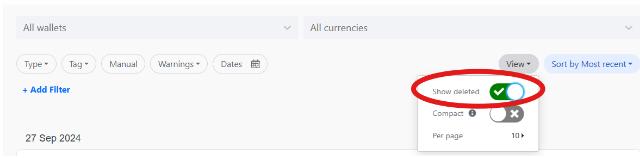
For a confirmed duplicate, open the unwanted transaction and use the bin icon. To inspect the result, open View and enable Show deleted. If you removed the wrong entry, use its menu to restore it. These controls and their effects are documented in Koinly's deletion and restoration guide.
Official Koinly interface example from the deletion guide, captured on October 19, 2026. The red circle is part of Koinly's original illustration; the switch reveals crossed-out transactions.
For investigation by import batch, Koinly documents Wallets → the affected wallet → View History. Review the relevant import before considering a batch correction. A batch can contain both duplicates and unique transactions, so one confirmed duplicate does not justify removing the entire import. Source: import-history controls.
Check the result before importing again
Compare the affected asset's recorded balance with an exchange balance for the same point in time. Recheck the original disputed event and any connected transfer. Keep a short correction note identifying the retained entry, the excluded entry and the evidence supporting your choice. A matching total alone is not enough if the underlying records remain unexplained.
For future imports, choose a consistent method and report format. Koinly discourages overlapping API and CSV data. Its file-import guide describes a Start import from date for standard API-key connections when transitioning from historical CSV records; it notes that this option is unavailable for its “Continue with” OAuth connections. Check the documented options for your integration rather than assuming every connection supports the same cutoff. Source: Koinly's file-import instructions.
Write down the last verified event in the historical file and inspect the first events returned by the connection. This boundary check should reveal either overlap or a gap before you rely on the combined history.
If the evidence remains ambiguous, send official support a concise description of the wallet, import methods, covered periods and disputed entries. Share account records only through the official private support channel, with unrelated personal information removed. Never include API secrets, passwords, authentication codes or recovery phrases.